 CalcKit
Area of Triangle with Coordinates
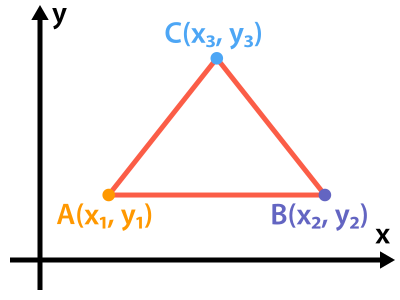


This calculator finds the area of a triangle from the coordinates of its three corners, (X1, Y1), (X2, Y2) and (X3, Y3), with no need for its sides or angles.
The formula
A = 1/2 * |X1 * (Y2 - Y3) + X2 * (Y3 - Y1) + X3 * (Y1 - Y2)|
It is known as the shoelace formula, from the criss-cross way the coordinates are multiplied. The vertical bars are the absolute value: the sum inside is negative when the corners are listed clockwise, so the bars keep the area positive whatever the order.
The area is in square units of the coordinates: corners in meters give an area in square meters.
Example
A triangle with corners at (1, 2), (4, 6) and (7, 1):
-
The three products:
1 * (6 - 1) = 54 * (1 - 2) = -47 * (2 - 6) = -28 -
Their sum:
5 - 4 - 28 = -27 -
Half its absolute value:
A = 1/2 * 27 = 13.5
Points on one line
If the area comes out as 0, the three points lie on one straight line, and there is no triangle. That makes the formula a quick test of whether three points are collinear: (0, 0), (2, 3) and (4, 6) give A = 0.
Frequently asked questions
Can I find the side lengths from the coordinates too?
Yes. Each side is the distance between two corners, √((X2 - X1)² + (Y2 - Y1)²), which the 2D Distance Calculator finds. With the three sides, the Triangle Calculator gives the angles and the rest.
Does it work for other polygons?
The shoelace formula does, by going round all the corners, but this calculator takes three. A polygon can be split into triangles from one corner, and their areas added up.